
Best Shopify Cart Customization Apps (2026)
Last updated: April 2026 · Pricing and ratings verified from live Shopify App Store listings on April 22, 2026. Reviewed by the Libautech team, builders of Bundles & Upsell and Sticky Add to Cart — Built for Shopify apps used by 5,000+ merchants across 50+ countries.
Key Takeaways
- Cart customization is not one job — it is three. The drawer content layer, the persistent path-to-cart layer, and the checkout rules layer. Most merchants need one app from each and none from the same one.
- Libautech Bundles & Upsell is the strongest pick for the drawer content layer — cart popup upsells, cart drawer offers, and product-page add-ons in one Built for Shopify app at $14.99/mo.
- Libautech Sticky Add to Cart is the strongest pick for the persistent path-to-cart layer — a free plan, 5.0 rating, Built for Shopify badge, and no conflicts with cart drawer apps.
- UpCart holds 4.8 stars across 900+ reviews with full CSS and HTML customization — the right pick if your goal is a pixel-perfect branded slide cart drawer.
- Hide Payment & Shipping iWeb is the budget pick for checkout rule customization — payment method hiding, shipping sort, and renaming under one subscription from $3.99/mo.
- A fully configured cart stack — sticky button plus drawer upsells plus free shipping bar plus one payment rule — lifts AOV 15–30% within the first month on stores doing over $10K/month.
The Three Jobs of Cart Customization
Most roundups of Shopify cart customization apps list six tools that do completely different things as if they competed. They do not. A sticky Add to Cart button does not compete with a cart drawer upsell. A payment method hider does not compete with a free shipping bar. Lumping them together makes it impossible to decide what to install.
The honest framing: cart customization breaks into three jobs, each with its own app category. Stores that rank well on conversion run one app from each, not three from the same one.
The first job is drawer content — what the customer sees when they open the slide cart. Upsells, free shipping bars, progress indicators, cross-sell offers. This is where AOV actually gets lifted.
The second job is the persistent path to cart — making sure the buy button never disappears as the customer scrolls. Sticky Add to Cart buttons, sticky cart icons, floating cart widgets. This is where mobile conversion gets recovered.
The third job is checkout rules — controlling which payment methods, shipping methods, and checkout options appear for which customers. This is where chargebacks, COD disputes, and wrong-shipping-method errors get prevented.
This post ranks 8 apps across the three jobs based on verified April 2026 pricing, Shopify App Store ratings, and what each one actually solves.
Cart customization stacks with other AOV tools. See our guides on best cart drawer upsell apps for a deeper dive into the drawer content layer, best popup apps for email capture and popup upsells, and best product add-ons apps for upsell offers before the cart stage.
Quick Comparison: 8 Best Shopify Cart Customization Apps (2026)
| App | Rating | Free Plan | Paid From | Layer | Best For |
|---|---|---|---|---|---|
| Libautech Bundles & Upsell | ⭐ 5.0 (36) | No (7-day trial) | $14.99/mo | Drawer content | Cart popup upsells, drawer offers, FBT in one app |
| Libautech Sticky Add to Cart | ⭐ 5.0 (9) | Yes | $6.99/mo | Persistent path | Free sticky ATC bar with Built for Shopify badge |
| UpCart — Cart Drawer | ⭐ 4.8 (916) | Yes | $29.99/mo | Drawer content | Pixel-perfect branded cart, DTC brands |
| iCart Cart Drawer | ⭐ 4.8 (480) | Yes | $9/mo | Drawer content | Drag-and-drop cart builder with no-code editor |
| Monster Cart | ⭐ 4.8 (521) | Yes | $14.99/mo | Drawer content | Free gift mechanics, BOGO, gift-with-purchase |
| qikify Slide Cart | ⭐ 4.9 (415) | Yes | $14.99/mo | Hybrid | Sticky button + slide cart in one app |
| Hide Payment & Shipping iWeb | ⭐ 5.0 (35) | Yes | $3.99/mo | Checkout rules | Payment method hiding, shipping sort & rename |
| PayRules | ⭐ 4.9 (200+) | Yes | $4.99/mo | Checkout rules | COD hiding, chargeback protection, B2B rules |
Layer 1: Drawer Content (What Customers See Inside the Cart)
This is where AOV actually moves. The customer already decided to buy — the cart drawer determines how much they spend. Four apps cover this job well. Pick one, not more — multiple drawer apps installed on the same store create widget conflicts and break layouts.
1. Libautech Bundles & Upsell
Best for: merchants who want cart popup upsells, cart drawer offers, and product-page add-ons handled by one app — plus bundles, Frequently Bought Together, and post-purchase offers under a single flat subscription.
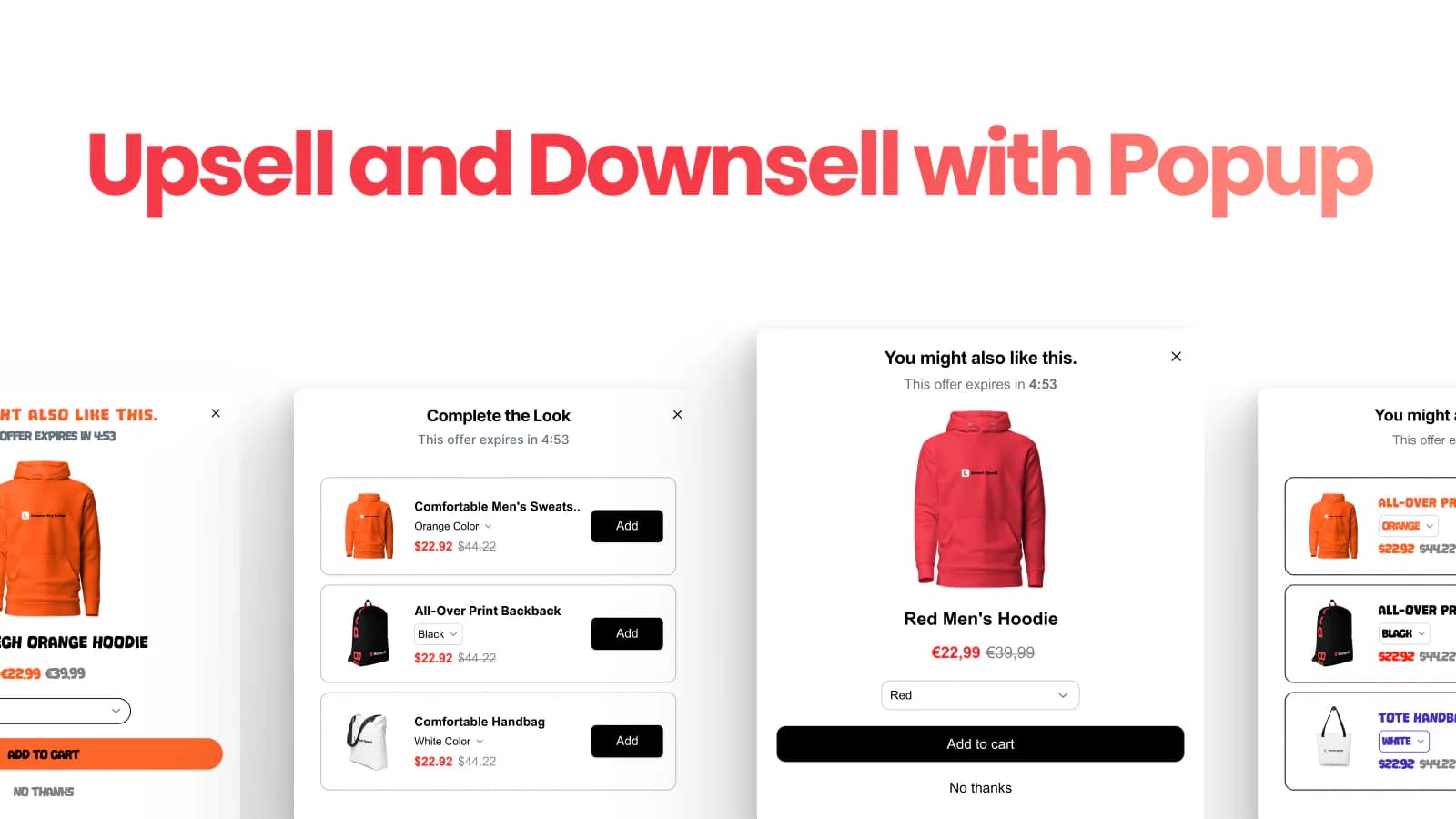
Libautech Bundles & Upsell covers the drawer content layer through three distinct mechanics: cart popup upsells that fire when a customer clicks Add to Cart, inline cart drawer offers that show complementary products during checkout review, and product-page add-ons that lift AOV before the cart stage entirely. All three mechanics pull from the same product catalog and share one configuration panel.
The app is Built for Shopify certified and holds a 5.0-star rating. It includes AI-powered recommendations based on cart contents, manual pairing rules for specific products, countdown timers to add urgency, and customizable widget styling with colors, borders, badges, and headline copy. For merchants who want the drawer to do more than display the cart — offer bundles, trigger upsell popups, and show post-purchase one-click offers from the thank-you page — Bundles & Upsell covers all of it in one subscription.
The pricing model matters at scale. Flat monthly tiers ($14.99 Starter, $29.99 Pro, $49.99 Unlimited) keep costs predictable as store volume grows. Competitors like UpCart charge order-based fees that escalate as your store scales — exactly when revenue is growing fastest.
Where it falls short: the app does not replace the entire cart drawer chrome with a custom slide cart design. If your goal is pixel-level control over the cart drawer appearance and layout, UpCart or iCart are dedicated drawer builders with deeper customization. Bundles & Upsell operates inside the existing cart drawer, adding offers and widgets rather than rebuilding the drawer itself. The 36-review base is also smaller than UpCart or iCart by volume, though the 5.0 rating and Built for Shopify status balance this.
View Libautech Bundles & Upsell on the Shopify App Store →
Pricing: 7-day free trial. Starter $14.99/mo, Pro $29.99/mo, Unlimited $49.99/mo. Flat-rate, no revenue cap.
2. UpCart — Cart Drawer Cart Upsell
Best for: DTC brands that want full design control over the cart drawer — including custom HTML, CSS, and JSX — and a dedicated cart builder rather than a broader upsell app.
UpCart is the most established dedicated cart drawer app on the Shopify App Store with 916 reviews and a 4.8-star rating. It replaces the default Shopify cart with a fully customizable slide-out drawer and layers in in-cart upsells, a free shipping progress bar, add-on modules (shipping insurance, gift wrap), announcements, and a sticky cart button. The defining strength is design depth — merchants can write actual HTML, CSS, and JSX to match the cart drawer exactly to their brand aesthetic rather than picking from preset templates.
The reward bar is UpCart's highest-ROI feature. A progress bar showing customers how close they are to free shipping or a free gift reliably drives one to two additional items per cart. Combined with an inline upsell module below the cart items, it creates a two-layer AOV lift inside a single drawer. UpCart is Built for Shopify certified.
Where it falls short: pricing is order-based, so the monthly cost scales with store volume — cost grows at the exact moment your revenue is growing fastest. There is no product-page or post-purchase coverage, so merchants wanting full-funnel AOV optimization need a second app. Some merchant reviews also flag AI-support limitations and slower resolution on edge-case technical issues.
Pricing: Free plan available. Paid from $29.99/mo, scales with order volume.
3. iCart Cart Drawer Cart Upsell
Best for: merchants who want a drag-and-drop visual cart builder with no-code progress bars, trust badges, countdown timers, and volume discounts inside the drawer.
iCart holds 4.8 stars across 480 reviews and positions itself as a full cart funnel builder rather than a pure drawer app. The drag-and-drop editor lets non-technical merchants configure upsells, volume discounts, BOGO offers, free shipping bars, countdown timers, and trust badges directly inside the cart drawer without editing code. It supports both slide drawers and popup cart formats, and works alongside any Shopify theme.
Starting pricing is $9/mo — the lowest paid tier in the drawer content layer of this category. The free plan covers basic functionality, and the paid plan unlocks analytics tracking for CTR, AOV, and offer conversion. iCart is a strong fit for merchants who want more than a drawer overlay but less than a full store builder.
Where it falls short: merchant reviews note that design customization beyond the drag-and-drop options is limited — stores with unique or highly customized themes will hit layout ceilings that UpCart does not have. The Capterra review cited this specifically: "iCart is very effective, but it could offer more design customization options for the cart drawer." Also billed on monthly widget views, which can become unpredictable on high-traffic stores.
Pricing: Free plan available. Paid from $9/mo.
4. Monster Cart Upsell + Free Gifts
Best for: stores running promotional mechanics — free gifts, gift-with-purchase thresholds, BOGO, auto-add offers — that need all of them managed from one cart drawer app.
Monster Cart holds 4.8 stars across 521 reviews and is purpose-built for promotional cart mechanics. The app handles auto-add-to-cart gifts-with-purchase (add a gift when cart value exceeds $100, for example), BOGO offers inside the cart, tiered discount triggers, and quantity-based free gifts. The design leans bold and colorful by default, which suits DTC brands in beauty, food, and fashion but requires customization to fit minimalist or luxury brands.
The rule engine is the core differentiator. A single offer can combine cart value, product category, customer segment, and time window conditions — allowing merchants to run multiple promotions in parallel without conflict. Built for Shopify certified.
Where it falls short: the default design aesthetic is not universal — merchants with premium or minimalist brand guidelines spend significant setup time customizing the visual style. Feature density also creates configuration complexity — merchants who just need a simple cart drawer with one upsell will find Monster Cart overbuilt.
Pricing: Free plan available. Paid from $14.99/mo, scales with order volume.
Layer 2: Persistent Path to Cart (The Sticky Button)
Mobile traffic accounts for over 70% of most Shopify stores. On mobile, when a customer scrolls past the Add to Cart button, it is gone — they have to scroll all the way back up to buy. This is where conversion gets lost silently. A sticky Add to Cart bar fixes this with one install, and it stacks cleanly with any cart drawer app because the two widgets do not overlap.
5. Libautech Sticky Add to Cart
Best for: stores that want a free, Built for Shopify sticky Add to Cart bar with customizable styling — paired alongside any cart drawer app without conflicts.
Libautech Sticky Add to Cart displays a persistent Add to Cart or Buy Now button that stays fixed at the bottom (or top) of the screen as the customer scrolls. The bar shows the product title, price, quantity selector, and a prominent call-to-action button — giving customers a one-click path to checkout from any point on the product page without scrolling back to the top. The 5.0-star rating and Built for Shopify certification confirm the app meets Shopify's performance and integration standards.
The app handles multiple display styles for both mobile and desktop, with separate design modes so mobile does not inherit a desktop-scaled layout. Action badges highlight key selling points next to the button (free shipping, limited stock, discount). Built-in performance analytics measure views, clicks, and conversion lift per product page. Customizable button text, colors, and placement match the bar to your brand. Judge.me integration surfaces product ratings directly in the sticky bar.
The key reason this app pairs with any drawer app: the sticky bar lives at the screen edge, while cart drawers slide over the center of the screen when triggered. The two widgets never occupy the same visual space, so they stack cleanly without conflict — Libautech Sticky Add to Cart plus UpCart, Libautech Sticky Add to Cart plus iCart, or Libautech Sticky Add to Cart plus Libautech Bundles & Upsell all work without breakage. The Package Plan at $14.99/mo unlocks access to all Libautech Premium apps under one subscription, which makes sense for stores already using (or planning to use) multiple Libautech tools.
Where it falls short: the review base is smaller (9 reviews) than older sticky cart apps. Stores that need the sticky button and the cart drawer from the same vendor for single-support-contact convenience may prefer qikify Slide Cart, which bundles both in one tool.
View Libautech Sticky Add to Cart on the Shopify App Store →
Pricing: Free plan available. Pro $6.99/mo. Package Plan $14.99/mo (includes access to all Libautech Premium apps). 7-day free trial on paid tiers.
6. qikify Slide Cart & Sticky Cart
Best for: merchants who want a sticky Add to Cart button and a slide cart drawer in the same app under one subscription.
qikify holds 4.9 stars across 415+ reviews and is the main app in the category that genuinely covers both layers — persistent path and drawer content — in one install. The sticky Add to Cart bar, floating cart icon, and slide cart drawer all share a single settings panel. The drawer includes a free shipping progress bar, cart upsell recommendations, countdown timers, discount code fields, and delivery estimation.
The generous free plan is the standout — it covers the full sticky bar, floating cart, note box, checkout messages, and analytics at zero monthly cost. The Premium tier at $14.99/mo adds cart upsells, announcements, and shipping calculations. For a store that needs both layers solved simultaneously without installing two separate apps, qikify is the cost-effective choice.
Where it falls short: the default drawer design is less modern than UpCart or iCart out of the box, and combining two functionalities in one app means neither is as specialized as a dedicated tool. Advanced design customization requires CSS edits rather than drag-and-drop controls. Stores that prioritize a premium branded cart aesthetic should evaluate UpCart separately.
Pricing: Free plan available. Premium from $14.99/mo.
Layer 3: Checkout Rules (Payment & Shipping Customization)
Shopify does not let you hide payment methods by default. If you accept Cash on Delivery, every customer sees it — even international orders where COD does not exist, creating failed payments and refund disputes. If you accept PayPal but want to hide it for orders over $1,000 to reduce chargeback risk, you need an app. This layer is the one merchants underinvest in until a pattern of failed orders forces the issue.
7. Hide Payment & Shipping iWeb
Best for: merchants who want payment method hiding and shipping method customization in one app at the lowest price point in the category.
Hide Payment & Shipping iWeb holds a 5.0-star rating and includes payment method hiding, renaming, and reordering alongside shipping method sort, rename, and hide — all under one subscription. Rules can trigger on cart contents, customer location, product or collection, order total, customer tags, and more. The app runs on Shopify Functions (the current supported API, not legacy Scripts that Shopify is sunsetting in June 2026), which means the app is future-proof and will continue working after the deprecation.
Starting pricing is $3.99/mo — the most budget-friendly tier in this layer. Built for Shopify certified, and the configuration is no-code, so merchants without developer resources can set up rules in minutes. The combined payment plus shipping coverage eliminates the need for two separate apps.
Where it falls short: the review count is smaller than market leaders like Shipfy or HidePay. Stores that need highly complex B2B logic or multi-carrier shipping rules may find the feature depth lighter than premium alternatives at 10x the price.
Pricing: Free plan available. Paid from $3.99/mo.
8. PayRules: Hide Payment Methods
Best for: merchants dealing with Cash on Delivery chargebacks, B2B customer-segmented payment rules, or needing to hide specific payment methods conditionally.
PayRules is purpose-built for payment method hiding and carries a 4.9-star rating. The app lets merchants hide payment methods (especially Cash on Delivery) based on multiple conditions — cart total, product, customer tag, B2B status, shipping method, or discount applied at checkout. COD disputes, account freezes from payment processor mismatches, and chargebacks from wrong payment method combinations are the specific problems this app solves.
The app is particularly valuable for merchants in regions where COD is common but high-risk for specific order types — hiding COD for orders over a certain value, for international addresses, or for first-time customers meaningfully reduces failed payments and refund volume.
Where it falls short: PayRules focuses on payment method hiding only — it does not handle shipping method customization. Stores that need both (payment and shipping customization) should evaluate Hide Payment & Shipping iWeb, which covers both layers at a similar price point.
Pricing: Free plan available. Paid from $4.99/mo.
Which App to Choose
For the drawer content layer (what AOV actually lifts): Libautech Bundles & Upsell. Cart popup upsells, drawer offers, and product-page add-ons in one flat subscription at $14.99/mo. The right pick if you also want bundles, FBT, and post-purchase offers in the same app.
For pixel-perfect branded drawer design: UpCart. Full HTML, CSS, and JSX control, 916 reviews, the deepest customization in the category.
For drag-and-drop no-code cart building: iCart. Lowest paid tier at $9/mo, drag-and-drop editor, works with any theme.
For promotional mechanics inside the drawer: Monster Cart. Auto-add gifts, BOGO, tiered discounts, multi-rule promotions.
For the persistent path-to-cart layer: Libautech Sticky Add to Cart. Free plan, Built for Shopify, 5.0 stars, stacks cleanly with any drawer app.
For sticky button plus drawer in one app: qikify Slide Cart & Sticky Cart. Both layers covered under one subscription, generous free plan.
For checkout rule customization (payment and shipping): Hide Payment & Shipping iWeb. Built for Shopify, $3.99/mo, covers both payment and shipping at the lowest price in the category.
For payment method hiding only (COD chargeback prevention): PayRules. Purpose-built, 4.9 stars, conditional rules for payment methods.
For most stores the honest stack recommendation is three apps, one from each layer. Bundles & Upsell for the drawer content, Sticky Add to Cart for the persistent path, and Hide Payment & Shipping iWeb for checkout rules — approximately $25/month total, covering every cart customization need a store under $100K/month will have.
How We Ranked These Apps
This ranking is based on four criteria applied to every Shopify cart customization app tested in 2026. First, Shopify App Store rating and verified review volume as of April 22, 2026. Second, pricing structure — flat-rate versus order-based versus view-based, and how total monthly cost scales with store growth. Third, scope of the cart customization job the app actually solves (drawer content, persistent path, or checkout rules) rather than generic feature checklists. Fourth, Built for Shopify certification and compatibility with Shopify Functions (the current API — apps built on legacy Shopify Scripts stop working June 30, 2026).
Every pricing figure in this post was verified directly from the live Shopify App Store listing on April 22, 2026. App pricing structures change — always confirm current pricing on the official listing before installing. Ratings and review counts reflect the Shopify App Store at the time of our last update.
Frequently Asked Questions
What does a Shopify cart customization app do?
A cart customization app modifies the shopping cart and checkout experience beyond what Shopify's default settings allow. This covers three distinct jobs: drawer content (upsells, free shipping bars, progress indicators inside the cart), persistent path to cart (sticky Add to Cart buttons that stay visible on scroll), and checkout rules (hiding or reordering payment methods and shipping methods). Most stores need one app from each of these three jobs, not three from the same one.
What is the best cart customization app for Shopify in 2026?
The best depends on which of the three jobs you need solved. For drawer content and AOV lift, Libautech Bundles & Upsell is the strongest flat-rate pick at $14.99/mo with cart popups, drawer offers, and add-ons in one app. For the persistent path-to-cart layer, Libautech Sticky Add to Cart has a free plan, 5.0 stars, and Built for Shopify certification. For checkout rules, Hide Payment & Shipping iWeb covers both payment and shipping customization at $3.99/mo.
Can I run multiple cart customization apps at the same time?
Yes, but only if the apps cover different layers. Running two cart drawer apps (for example UpCart plus iCart) creates widget conflicts and layout breakage. Running a cart drawer app plus a sticky Add to Cart app plus a checkout rules app works cleanly because the widgets never overlap. A typical working stack is Libautech Bundles & Upsell (drawer content) plus Libautech Sticky Add to Cart (persistent path) plus Hide Payment & Shipping iWeb (checkout rules), totaling about $25/month.
Do cart customization apps increase average order value?
Drawer content apps do. A properly configured cart drawer with a free shipping progress bar, one targeted upsell, and a sticky checkout button typically lifts AOV by 15–25% within the first 30 days. Sticky Add to Cart apps and payment method hiders do not lift AOV directly — they improve conversion rate (by keeping the purchase button visible) and reduce failed payments (by preventing incorrect payment method selection) respectively.
Will cart customization apps slow down my Shopify store?
Apps with the Built for Shopify badge — including Libautech Bundles & Upsell, Libautech Sticky Add to Cart, UpCart, and Hide Payment & Shipping iWeb — load widgets asynchronously. This means the cart features appear after the main page content loads, with no impact on core page speed or Lighthouse score. Non-certified apps vary. Always check for the Built for Shopify certification before installing, and test page speed before and after activation.
Do I need a Shopify Plus plan to customize checkout?
Not for most cart customization tasks. Cart drawer apps, sticky Add to Cart buttons, and basic payment method hiding work on every Shopify plan. Full checkout page customization (changing the layout, adding custom content blocks) historically required Shopify Plus, but Shopify Functions now extends a significant amount of this functionality to all plans. Apps like Hide Payment & Shipping iWeb and PayRules work on every Shopify plan without requiring Plus.
What is the difference between a cart drawer app and a sticky Add to Cart app?
A cart drawer app replaces or modifies the slide-out cart panel that opens when a customer clicks Add to Cart. A sticky Add to Cart app adds a persistent buy button that stays visible at the screen edge as the customer scrolls the product page. The two apps solve different problems at different stages — the sticky button keeps the purchase option visible, and the drawer modifies what customers see once they have added items. Most high-converting stores run one of each.
Why should I hide payment methods at checkout?
Two reasons: chargeback prevention and failed payment reduction. If you offer Cash on Delivery, international customers selecting COD will trigger failed orders. If you offer PayPal on high-value orders, chargeback risk climbs. Apps like PayRules and Hide Payment & Shipping iWeb let you show specific payment methods only when they are valid for that customer — by order total, region, customer tag, or product. This cleanly prevents the problem rather than handling disputes after the fact.
What happens to my cart customization when Shopify sunsets Scripts in June 2026?
Apps built on Shopify Functions (the current supported infrastructure) continue working without interruption. Apps built on legacy Shopify Scripts stop working on June 30, 2026. Every app in this list's checkout rules layer (Hide Payment & Shipping iWeb, PayRules) runs on Shopify Functions. If you are currently using a Scripts-based checkout customization tool, migrate before June 2026 to avoid checkout breakage.
Do cart customization apps work on mobile?
All apps on this list are mobile-optimized. Mobile traffic is over 70% of most Shopify stores, so any cart customization tool worth using must render correctly on small screens. Libautech Sticky Add to Cart, UpCart, and iCart all have dedicated mobile design modes — separate layouts for mobile rather than scaled-down desktop views. Always preview your cart customization on a phone before launching.
Think Your App Belongs on This List?
We update these lists as new tools launch and existing ones improve. If you are a developer building a Shopify cart customization app and want your app considered for inclusion, submit it here — tell us what your app does, who it is for, and include a link to your Shopify App Store listing. We review every submission.